
AI workers that do real back-office work.
A digital worker is one job done end to end: it reads the documents, works in the systems you already use, and asks a person before anything important is posted or sent. Every step is recorded.
An illustration of three of our workers' real steps. Sample data.
Not a chatbot. A colleague with one job.
A chatbot answers questions. A digital worker finishes work: it takes the input, does every step in your systems and hands you the result, with the evidence.
Works in your systems
It signs in to Microsoft 365, Business Central, Dynamics 365, QuickBooks, HaloPSA, HubSpot or your cloud with its own limited account, and works there like a careful new hire would.
Asks before it acts
Approval gates sit wherever you want them. Low confidence, a new supplier or a risky change goes to a person in chat first.
Shows its work
Every run keeps its inputs, its decisions and its results. You can always see what was done, why, and who approved it.
Watch a worker run, step by step.
These are the actual flows behind our workers, recorded in the Temy Labs flow editor. The highlighted step is the one running; the dashed line is where it goes next.
The real AP Clerk flow, in its QuickBooks version: a Google Chat message starts it, the hub records the invoice, the AI agent codes it, QuickBooks receives the bill, and the chat gets a report. It loops for up to 30 rounds and parks for a person if something is off.
Seven workers, each with a real case behind it.
AP Clerk
Reads supplier invoices from the AP mailbox, codes every line and enters a draft purchase invoice in Business Central or QuickBooks. Asks a person only when it is unsure.


AR Collections Clerk
Reads open customer invoices in Business Central, ages them and drafts a polite reminder per overdue customer in Outlook for a person to send.
Client Briefs
For IT service providers: reads each client's tickets, contract and devices in HaloPSA plus documentation in Hudu, and writes five briefs before the call.


Security Operations
A team of twelve security workers on one board: threat hunting, alert triage, attack surface, identity and cloud posture, detection engineering and more.


Compliance Evidence
Collects evidence for ISO 27001, SOC 2 and Cyber Essentials controls straight from Microsoft 365 and your other systems, grades each control and explains every gap.


Sales Assistant
Enriches and scores new leads in Dynamics 365 Sales or HubSpot, explains each score on the record and drafts the first email in Outlook.


Research and Monitoring
Reads the sources you care about every day, keeps what matters, rewrites it clearly and publishes a ranked digest. No repeats.


Its own portal, its own records.
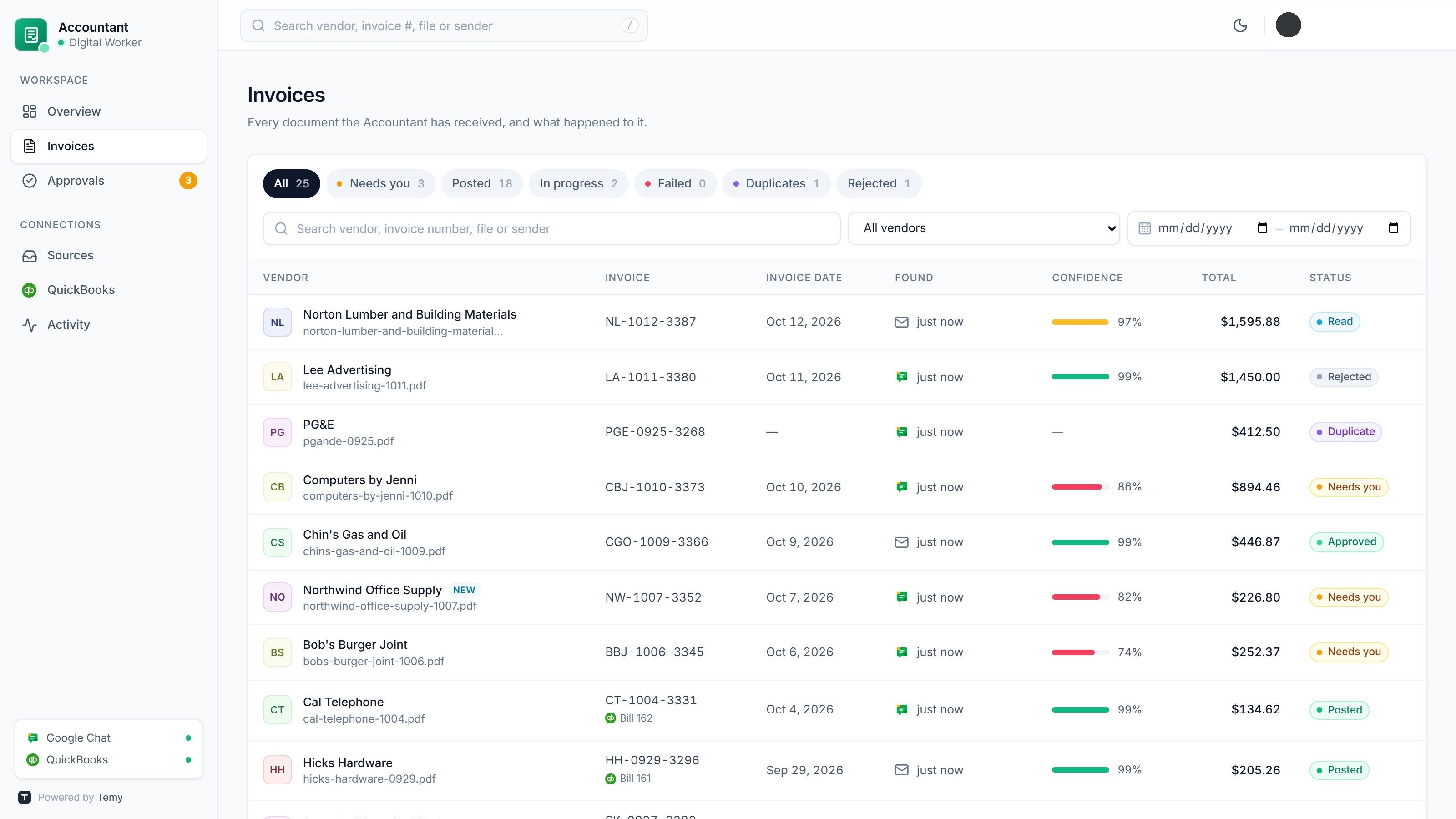
Every worker has a portal where your team sees what it received, what it did, what is waiting for approval and how sure it was. This is the AP Clerk's, on our accounting test company.
- Confidence score on every document
- "Needs you" queue for approvals
- Duplicates stopped before they reach the books
- Link from each bill to its source file
The systems your team already uses
QuickBooks OnlineGoogle Chat GmailHaloPSAHuduHubSpotApollo.io
 Snov.io
 JiraGitHubDigitalOceanSerpAPIGoogle SheetsDynamics 365 Business CentralOutlookMicrosoft 365Dynamics 365 SalesMicrosoft Entra ID
 Microsoft Defender
 Microsoft Teams
 SharePointQuickBooks OnlineGoogle ChatGmailHaloPSAHuduHubSpotApollo.ioSnov.ioJiraGitHubDigitalOceanSerpAPIGoogle SheetsDynamics 365 Business CentralOutlookMicrosoft 365Dynamics 365 SalesMicrosoft Entra IDMicrosoft DefenderMicrosoft TeamsSharePoint
Runs on Microsoft 365, Dynamics 365 Business Central and Dynamics 365 Sales, signing in with a certificate and no passwords. Plus any system with an API.
From first call to a worker in production.
Pick one job
A repetitive process with clear inputs and a clear result. We map it with you in one session.
Connect
The worker gets its own limited access to the systems involved. Nothing more.
Shadow run
It works alongside your team on real cases and records what it would do, without posting anything.
Go live
You switch on the steps you trust, keep approvals where you want them, and pay for the work done.
See a digital worker do your job.
30 minutes, on your own process. We show a worker running end to end and agree what a first pilot would prove.